

How To Create A Control Chart In Excel 2010
Control Chart Excel Template |How to Plot Control Chart in Excel | Download Template:
Hi! Reader, today we will guide you on how to plot control chart in Excel with an example. To take more concentration on Process Improvement, control chart always takes vital rules to identify the Special causes and common causes in Process Variation. Control Chart Excel Template is available here; just download it by click on the
Download Control Chart Excel Template.
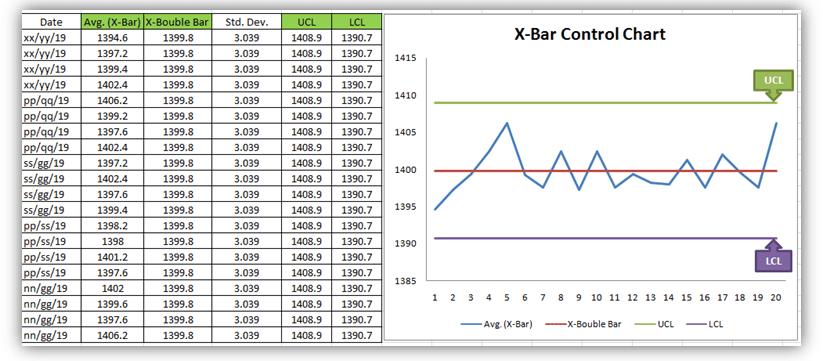
[Figure 1-X- Bar Control Chart Excel Template]
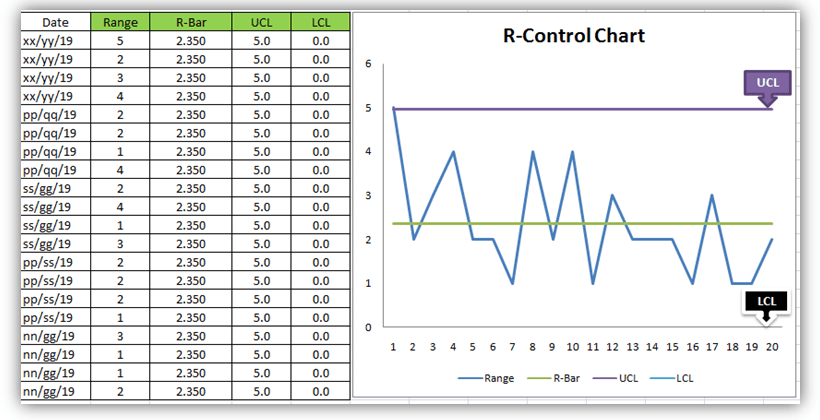
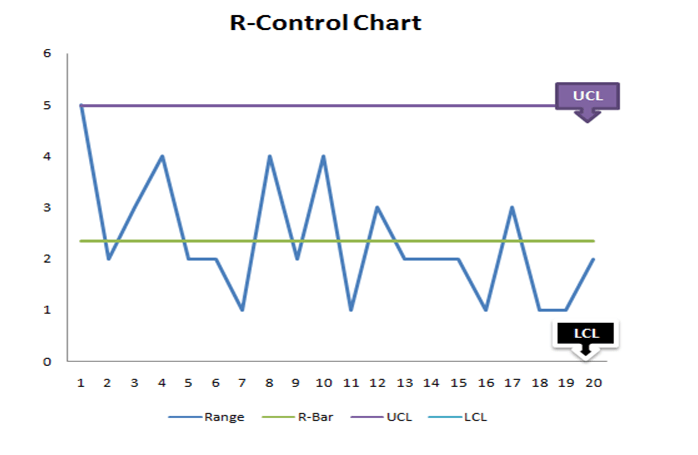
[Figure 2-R-Control Chart Excel Template]
Control Chart is a graphic representation of a characteristic of a process, showing plotted values of some statistic gathered from that characteristic, a centerline, and one or two control limits. It has two basic uses as a adjustment to determine if a process has been operating in statistical control, and to aid in maintaining statistical control.
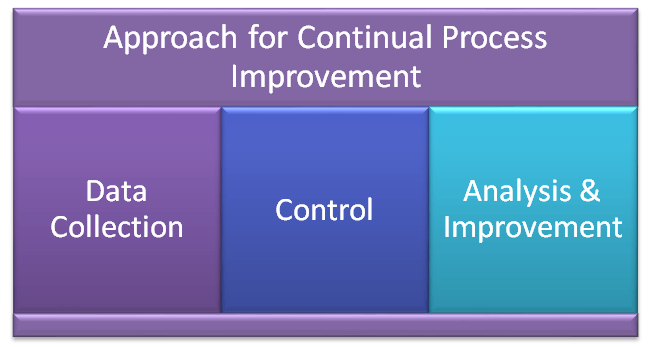
Control Chart Approach for Continual Process Improvement:
- Data Collection.
- Control.
- Analysis and Improvement.
- Data Collection:-
- To Collect Data and Plot the Control Chart.
- Control:-
- Calculate control limits from process data.
- Identify Special Causes of Variation and Act upon them.
- Analysis & Improvement:-
- Quantify Common Cause Variation, take action to reduce it.
You will also like to read the CAPA Process
7QC Tools for Problem Solving | What are 7 QC Tools
How to Plot Pareto Chart in Excel ( with example)
How to Create Control Chart Excel Template| Step by Step Guides (X-Bar & Range Chart) with Example:
Step-1: Collect The Data day wise/shift wise.
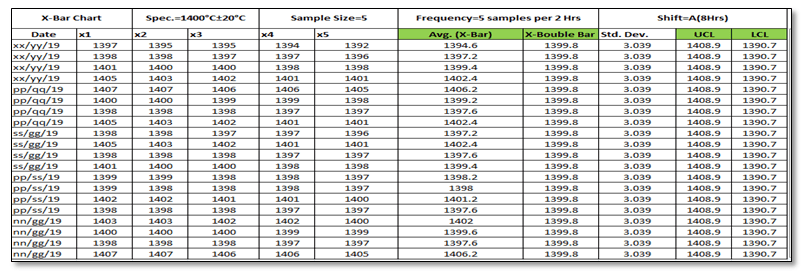
As you can see in the above figure, we have collected data with sample size 5 for A-Shift with frequency (5 samples per 2 hours). So we are having only one shift data for 5 days. Totally 100 number observations. You are supposed to collect the data as per Control Plan or Quality Assurance Plan.
Step-2: Select the Data types and applicable Control Chart.
So we are having variable type data and the
Step-3: According to data type and Sample size, presently we are going to plot the X-Bar & R-Chart. So individually we will plot both chart (X-Bar Chart & Range Chart). First we will plot X-Bar Chart and then R-Chart.
3.1 X-Bar Chart:
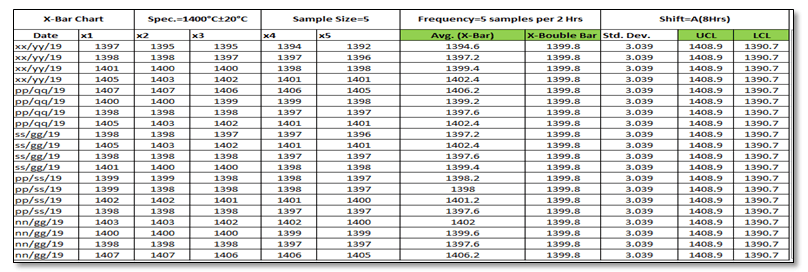
Before we start, just you go through the green highlighted terms in above figure as: [1] Average
[2] X-Double Bar means average of average. [3] Standard Deviation. [4] UCL. [5] LCL.
Calculation:
[1] Average:
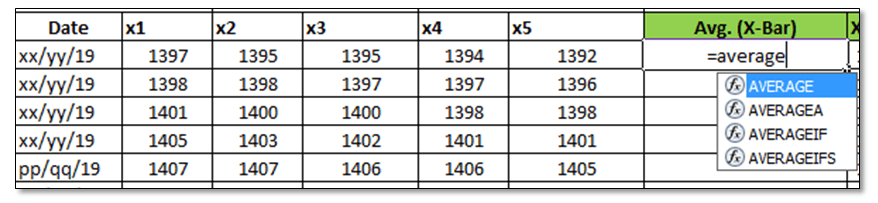
Make sure that your attention is now at right side corner of above figure. To calculate the average value of individual subgroup size. You have to type as (=average)and then double click on average function and next to select the sample value from x1 to x5.
[2] X-Double Bar: After calculating the Average value of all Subgroup (Individual Date wise), now we have to calculate the average of Average (Average of X-Bar).
[3] Standard Deviation: Standard Deviation of Average (X-Bar),
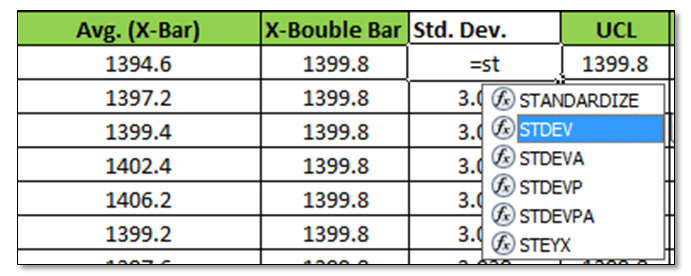
Type as (=Stdev) and select all X-Bar Data to Calculate the Std. Dev. of Average.
[4] UCL:
UCL=X Double Bar +3*Sigma
UCL= X Double Bar +3*Standard Deviation
For calculation the UCL in excel, put the above formula.
[5]LCL:
LCL=X Double Bar -3*Sigma
LCL= X Double Bar -3*Standard Deviation
Use above Formula in excels.
3.11 Plot X-Bar Chart: This is the last Step to plot the X-Bar Chart by using Line Graph in Excel, follow the below steps as:
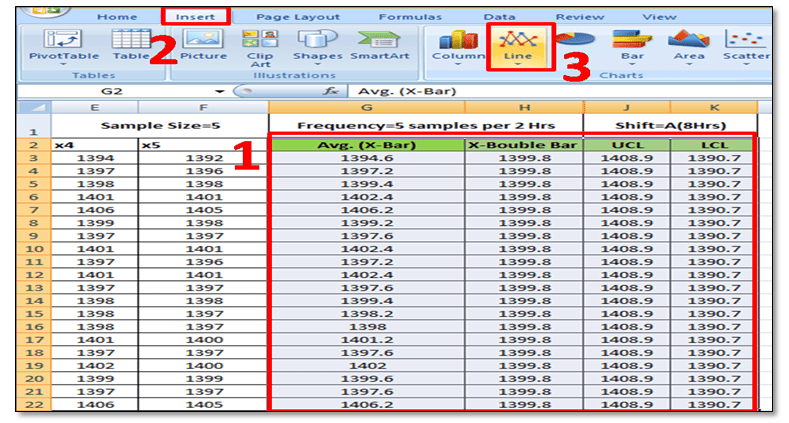
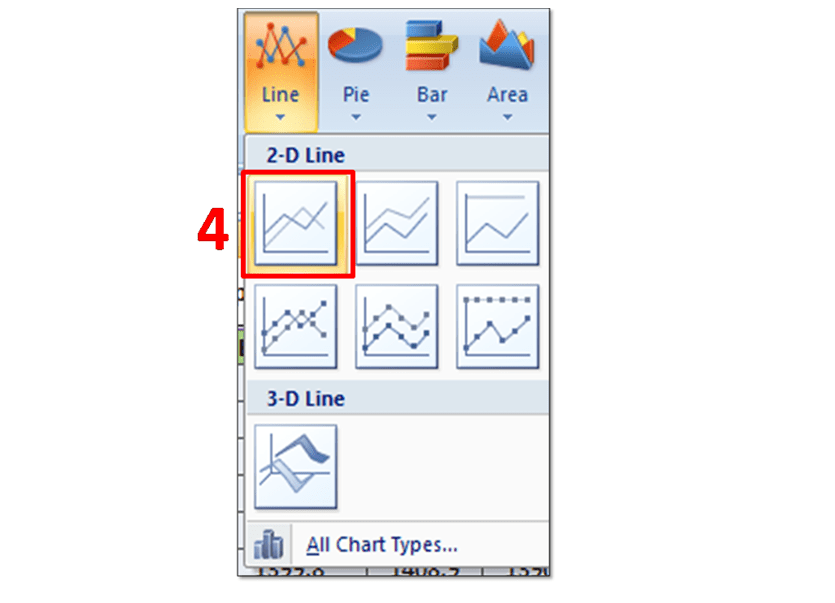
Simply Follow Sl. No.1 to 4.
In Sl.No.1, Select X-Bar, X-Double Bar, UCL, LCL and then select Insert Option and next to Line Chart. After selecting the Line Graph/Chart, The X-Bar Control Chart Excel Template will be ready as below.
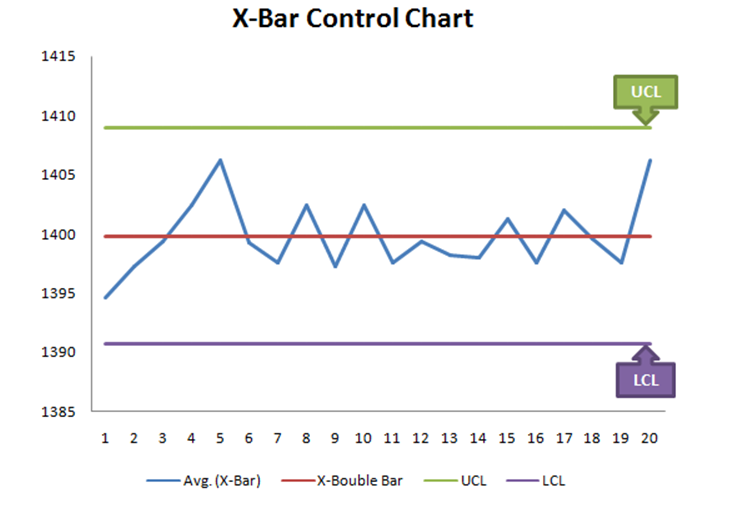
3.2 Range Chart:
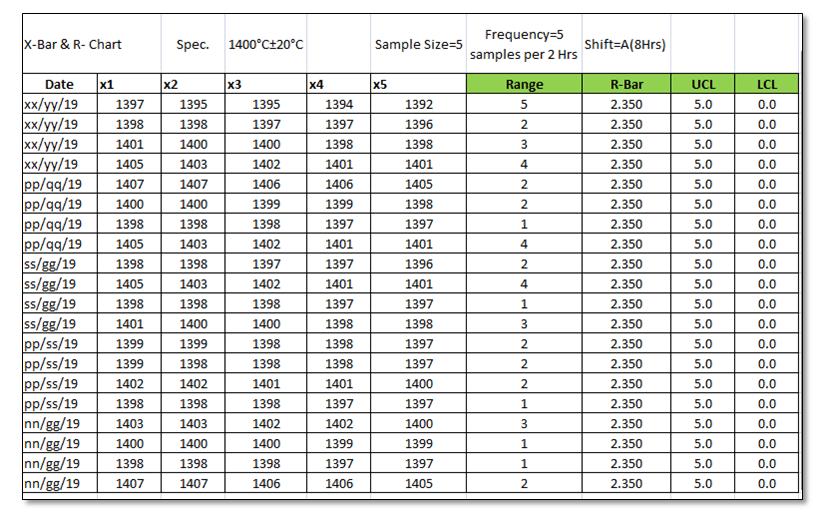
To Plot the R-Control Chart, we have to calculate the [1] Range. [2] R-Bar (Average of Range). [3]UCL. [4]LCL.
[1] Range: R=Max. Value – Min. Value of Subgroup.

[2] R- Bar (Average of Range): Put the excel formula of average.
[3] UCL:
UCL= D4 x R-Bar
UCL= 2.114 x R-Bar Value of individual Subgroup. (Note for Subgroup Size 5, D4=2.114).
Use this formula in Excel to calculate the UCL.
[4] LCL:
LCL=D3 x R-Bar
LCL=0 (Note Foe subgroup size 5, D3=0)
Simply put the "0" in excel sheet.
3.22 Plot R-Chart: Just follow the step 1 to 3, and select the line chart.
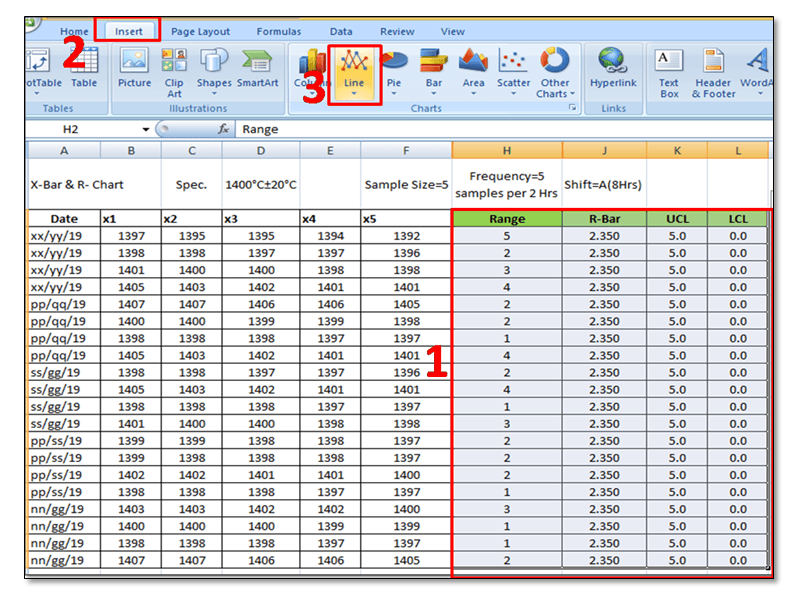
In step-1, you have to select the "Range, R-Bar, UCL, and LCL" simultaneously and then select the Line Chart, after selecting the line chart R-Control Chart Excel Template will be ready as below
FAQ:
Q1: What are control chart rules?
A1: Read the full articles as "What is SPC".
Q2: How to add upper and lower control limits in excel?
A2: Carefully read the aforesaid Articles.
Q3: How to create a control chart in excel 2013?
A3: Step by Step guide is described in above with Statistical process control charts examples. Please go through it.
Q4: How to create a six sigma control chart in excel?
A4: Control chart are classified into two types as [1] Variable type and [2] Attribute Type. Both two types are further classified into several as
[1]Variable types
- X and MR Chart
- X-Bar and Range
- X-Bar and S
[2] Attribute Chart
- np-chart
- p-chart
- u-chart
- c-chart
In the above articles we have described only on how to create X-bar and Range type Control Chart in excel with process control chart example. As you can see all these above types of control chart are used in six sigma projects but the applicable of chart depends on Data type and Subgroup size (Sample size).
Q5: How to calculate upper and lower control limits (ucl & lcl) in excel?
A5: For X-Bar Chart-UCL:
UCL=X Double Bar +3*Sigma
UCL= X Double Bar +3*Standard Deviation
For calculation the UCL in excel, put the above formula.
LCL:
LCL=X Double Bar -3*Sigma
LCL= X Double Bar -3*Standard Deviation
Use above Formula in excels.
For R-Chart:
UCL:
UCL= D4 x R-Bar
UCL= 2.114 x R-Bar Value of individual Subgroup. (Note for Subgroup Size 5, D4=2.114).
Use this formula in Excel to calculate the UCL.
LCL:
LCL=D3 x R-Bar
LCL=0 (Note Foe subgroup size 5, D3=0)
Simply put the "0" in excel sheet.
Q6: What are the types of control charts?
A6: [1] Variable types
- X and MR Chart
- X-Bar and Range
- X-Bar and S
[2] Attribute Chart
- np-chart
- p-chart
- u-chart
- c-chart
Download Free Template.

Thank you for reading…….keep visiting Techiequality.Com
I hope the above article is useful to you…
Popular Post:
About Author

TECHIEQUALITY
Author is Expert in Quality Management System, Operation Management, Business Excellence, Process Excellence, IATF 16949, ISO 9001, ISO 14001, ISO 45001, ISO 17025, TQM, TPM & QA. He is Certified as an IA for ISO 9001, IATF 16949, ISO 14001, ISO 17025 & ISO 45001 Standard.
How To Create A Control Chart In Excel 2010
Source: https://www.techiequality.com/2019/03/16/control-chart-excel-template/
Posted by: simonssayint.blogspot.com
0 Response to "How To Create A Control Chart In Excel 2010"
Post a Comment